WordPress Blocksy Theme Load Child Theme CSS

Child Theme

We understood that it’s recommended to use a Child Theme to add/edit the functionality of parent theme. A default Blocksy functions.php unable to load Child Theme CSS. We need to add code to load Child Theme CSS.

Default Blocksy theme’s function.php

if (! defined('WP_DEBUG')) {
	die( 'Direct access forbidden.' );
}
add_action( 'wp_enqueue_scripts', function () {
	wp_enqueue_style( 'parent-style', get_template_directory_uri() . '/style.css' );
});

Updated Blocksy theme’s function.php

if (! defined('WP_DEBUG')) {
	die( 'Direct access forbidden.' );
}
add_action( 'wp_enqueue_scripts', function () {
	wp_enqueue_style( 'parent-style', get_template_directory_uri() . '/style.css' );
	//Add code below to load Child Theme CSS
	wp_enqueue_style( 'child-style', get_stylesheet_uri() );
});

Add replacing the code above, you may add CSS to Child Theme and able to load from front-end.

WordPress Blocksy Theme Load Child Theme CSS

Please do hesitate to contact me if you found out any mistake or typo.
WordPress Disable Auto Update

Auto Update

WordPress auto update have always been enable since WordPress 5.6. Sometime admin need to double check those theme and plugins are compatible with latest WordPress, they don’t need an auto update.

Add snippet below into config.php to disable all automatic updates.

define( 'AUTOMATIC_UPDATER_DISABLED', true );

WordPress Disable Auto Update

Please do hesitate to contact me if you found out any mistake or typo.
WordPress Change Revisions Limit

WordPress Post Revisions

Too much post revisions will increase the WordPress database storage. Revisions are full copies of the post. If want to decrease the database size, limit the how many revisions should be saved is a good option.

Add the code below in config.php

define( 'WP_POST_REVISIONS', 3 ); //Only 3 post revisions will be stored

Old version of revision will be deleted once the post is updated again.

WordPress Change Revisions Limit

Please do hesitate to contact me if you found out any mistake or typo.

WooCommerce Change Currency Symbol

Currency Symbol

Quite a lot country currency is $ (Dollar). When setup WooCommerce, some business owners will setup the currency which is $, it’s quite complicated when customer confuse about $ is belong to United States Dollar, Australian Dollar, Hong Kong Dollar, Singapore Dollar or others?

HTML Number

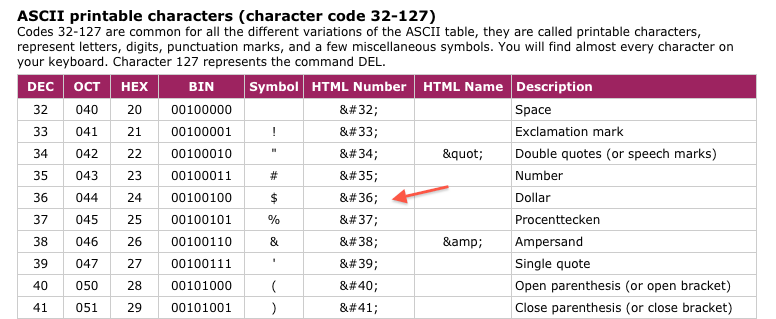
According ASCII-CODE website, HTML Number of $ is [ $ ]. So we need use $ for the symbol of dollar.
Dollar Symbol HTML Number

WooCommerce Change Currency Symbol

For example, we want change the currency symbol of Singapore Dollar $ to S$, what we need is add the coding below to functions.php

// Change Currency Symbol
add_filter( 'woocommerce_currency_symbol', 'change_currency_symbol', 10, 2 );
function change_currency_symbol( $symbols, $currency ) {
	if ( 'SGD' === $currency ) {
		return 'S$';
	}
        return $symbols;
}

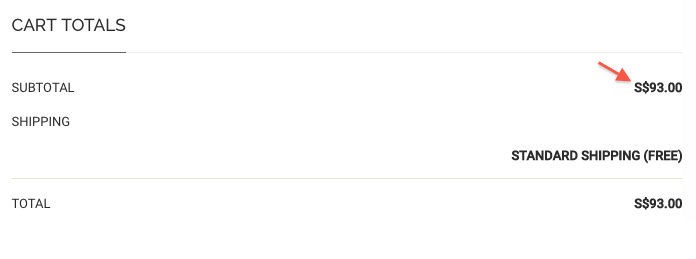
Result:
Cart After Change Currency Symbol

WooCommerce Change Currency Symbol
Please do hesitate to contact me if you found out any mistake or typo.

WooCommerce Remove Sidebar

Remove Sidebar

This is a snippet to remove all WooCommerce page sidebar. By this snippet, it will only remove the sidebar. You still need to edit style.css to set the width of main to 100%. This is a method using hook instead of edit the template file.

Paste below coding at your theme’s function.php

//WooCommerce Remove Sidebar 
remove_action( 'woocommerce_sidebar', 'woocommerce_get_sidebar', 10 );

Now, sidebar at all WooCommerce is been removed. You also need to add this coding to your child theme style.css. Some themes are not working. You need to find out the div class or id to set.

Paste below coding at your theme’s style.css

/* WooCommerce Remove Sidebar, Main Width 100% */
.tax-product_cat #main {
	width: 100%;
} 

For sure, you may leave a comment so that we could discuss about how to edit the css of your WordPress theme if you can’t set the main width successful.

WooCommerce Remove Sidebar
Please do hesitate to contact me if you found out any mistake or typo.